Table of contents
Key takeaways
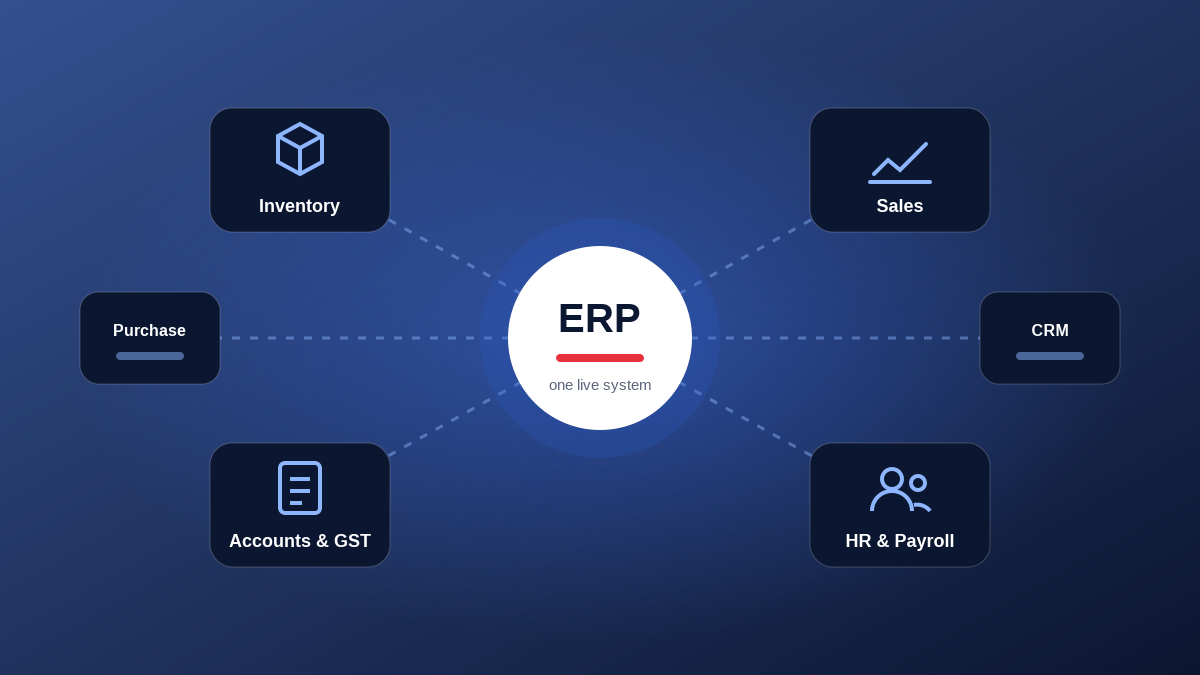
- ERP brings sales, purchase, inventory, accounts and HR onto one live system.
- Mismatched stock, delayed invoices and manual reports are early warning signs.
- Start with the biggest pain point and implement in phases.
- Training your team is as important as choosing the software.
Most growing businesses start with Excel sheets, a billing tool and a lot of WhatsApp messages. It works — until the business grows. Then teams spend hours reconciling numbers, and owners make decisions on data that is already out of date. An ERP (Enterprise Resource Planning) system connects everything on one platform.
The 7 signs
1. Your stock numbers never match
If the system says 50 units but the godown has 38, orders get promised that cannot be delivered. ERP updates inventory in real time with every sale and purchase.
2. Invoicing and GST take too long
Manual invoices, e-way bills and month-end GST reports eat up days. ERP generates GST-ready invoices and reports automatically.
3. Nobody has a single view of the customer
Sales, accounts and support each keep their own records. With integrated CRM, everyone sees the full history of every customer.
4. Reports take hours to prepare
If managers copy-paste data from multiple sheets to build a report, those hours are wasted every week. ERP dashboards are live.
5. Mistakes keep repeating
Duplicate entries, wrong rates and missed follow-ups are signs that your process depends too much on memory and manual work.
6. You cannot work away from the office
Cloud ERP lets owners and managers check sales, stock and approvals from a phone, anywhere.
7. Growth feels harder, not easier
When adding a new branch, warehouse or product line means more chaos, your systems — not your team — are the bottleneck.
What does an ERP system include?
ERP is modular — you can start small and add more over time. Typical modules for Indian SMEs are:
- Sales & CRM — leads, quotations, orders and customer history.
- Purchase — vendors, purchase orders and approvals.
- Inventory & warehouse — stock levels, batches, multiple godowns and reorder alerts.
- Accounts & GST — invoicing, payments, ledgers, e-way bills and GST returns data.
- HR & payroll — attendance, leave, salary and statutory deductions.
- Manufacturing — bills of material, production planning and costing.
- Reports & dashboards — real-time KPIs for owners and managers.
Cloud ERP or on-premise?
For most small and medium businesses, cloud ERP is the practical choice: no servers to maintain, automatic backups, and access from any device. On-premise ERP makes sense mainly when you have strict data-control requirements or unreliable internet at critical sites — and even then, a hybrid setup is often better.
Ready-made platform or custom ERP?
Platforms like Odoo, ERPNext and Zoho cover common workflows and are quicker to launch. A custom ERP is worth it when your process is unique — for example, a manufacturer with special costing rules or a distributor with complex scheme calculations. Many businesses get the best of both by customising an open platform instead of building everything from scratch.
What does ERP cost?
Cost depends on the number of users, modules, customisation and data migration. Subscription-based cloud ERP keeps the upfront investment low, while custom development is a one-time project cost plus maintenance. The right comparison is not just the price of the software, but the hours your team will save every month and the errors you will avoid.
How to implement ERP without disruption
- Map your processes — document how sales, purchase and accounts actually work today.
- Start with the biggest pain point — often inventory or billing.
- Choose the right platform — Odoo, ERPNext, Zoho or a custom ERP, based on your workflow and budget.
- Migrate clean data — fix duplicates before importing.
- Train your team — short, role-based sessions work best.
- Go live in phases — add modules once the first one is running smoothly.
Our ERP & CRM team in Lucknow helps SMEs choose, customise and roll out ERP step by step.